The most important fact you need to understand in 2025 is this: your blog cannot rank if Google cannot index it, and Search Console remains the only reliable way to diagnose why indexing fails.
Every ranking problem eventually traces back to a coverage problem; Google either did not crawl the page, could not interpret the page, or deliberately chose not to index it.
Blogging websites are especially vulnerable because they produce content frequently, depend on internal linking, and often use themes, plugins, or CMS structures that generate crawl barriers.
1. How Search Console Indexing Works in 2025
Before addressing specific coverage errors, it’s essential to understand the process Google uses. Indexing is no longer a simple crawl → index cycle. Google now uses multiple evaluation layers based on quality, speed, mobile usability, and E-E-A-T signals.
A page must pass through three filters:
- Crawlability – Can Googlebot physically access the page?
- Technical Interpretation – Is the page readable, structured, and stable?
- Quality Assessment – Is the content worth indexing compared to alternatives?
If a blog fails even one filter, Search Console will show an indexing error. These errors are not random; they reflect Google’s evaluation of value and accessibility.
2. Most Common Indexing Problems in Search Console for Blogging Websites
Blogging websites face unique challenges because they generate large volumes of content, tag pages, category pages, pagination, and archives.
These structures often produce unwanted URLs and duplicate content, which makes Google selective in what it chooses to crawl.
Below are the core indexing problems bloggers face in 2025, each explained clearly.
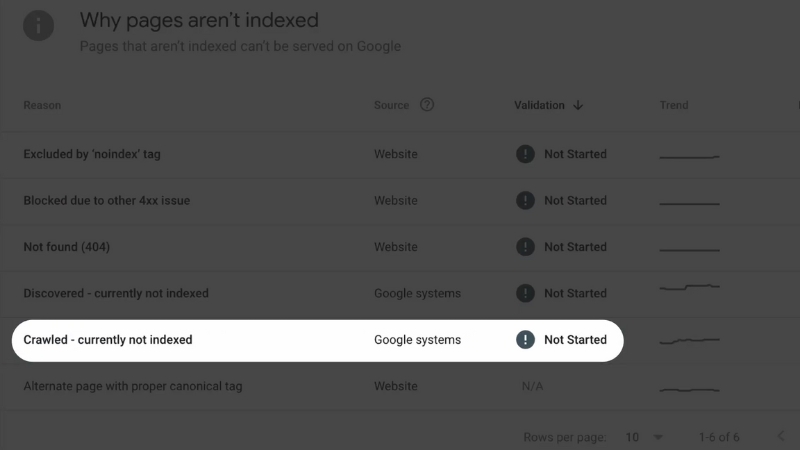
3. “Crawled – Currently Not Indexed”: The Most Misunderstood Error
View this post on Instagram
This is the most common issue for blogs. It means Google successfully crawled the page but decided not to put it in the index. Google usually does this when the page is:
- too thin
- too similar to other pages
- too slow
- lacking internal links
- perceived as low-value
For blog posts, this often happens right after publishing if the structure is weak or the site has too many “filler” pages (tags, pagination, thin categories).
Fixes
The fix requires improving the page’s value signals, not resubmitting it repeatedly. Add internal links, expand content depth, improve metadata, add visuals, update facts, or merge it with similar content.
4. “Discovered – Currently Not Indexed”
This is a crawling budget problem. Google knows the page exists but hasn’t crawled it yet. For large blogs, this happens when too many URLs are generated (tags, categories, newsletters, archives).
Fixes
- Reduce the number of low-quality URLs
- Block unnecessary archives or tag pages
- Improve internal linking to the post
- Increase crawl demand by linking from high-authority pages
The faster Google can reach the page, the faster it can evaluate it.
5. “Duplicate Content” and Canonical Problems
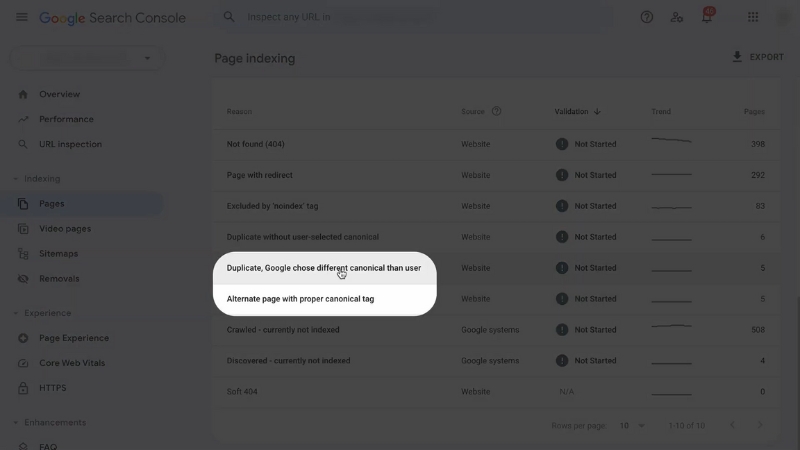
Many blogs unintentionally generate duplicate content. This happens through category archives, tag pages, author pages, or pagination. Google often sees these as nearly identical, so it ignores them.
In 2025, Google is stricter: if multiple versions of a page exist, Google may skip the post entirely until canonical signals are clear.
Common Duplicate Sources in Blogs
| Duplicate Source | Why It Happens | Fix |
| Tag pages | Same content listed repeatedly | Limit tags or noindex them |
| Category archives | Thin previews | Noindex category pages or improve them |
| Pagination | Creates multiple similar URLs | Use rel=“prev/next” or canonical |
| URL parameters | Sorting, filtering options | Block via robots.txt or parameter handling |
6. “Alternate Page With Proper Canonical Tag”
This message means Google chose a canonical version of the page that is not the one you want indexed. This frequently affects blogs using AMP versions, mobile variants, or plugin-created duplicate URLs.
Fixes
- Make sure each post has one clean URL
- Remove plugin-generated duplicates
- Ensure canonical points to the correct page
- Reduce conflicting signals from internal links
Google will always choose the most consolidated version.
7. “Blocked by robots.txt” or “Blocked by Noindex..e.x.”

Many bloggers accidentally block their blog posts during theme changes or site migrations. This prevents Google from crawling entirely.
Fixes
- Ensure /wp-content/uploads/ is accessible
- Do not noindex tag pages if you rely on them for structure
- Remove unnecessary “noindex” tags from individual posts
- Allow Googlebot to crawl CSS and JS files
Sometimes, a plugin accidentally adds a noindex, so always verify.
8. “Page With Redirect.”
This error appears when content is redirected, but the redirect chain becomes too long or loops. Blogs using old URL structures or category changes often suffer from this.
Fixes
- Use one-step 301 redirects
- Remove outdated 302 redirects
- Eliminate redirect chains longer than one hop
- Correct internal links to the new URL to reinforce the canonical value
Redirect chains slow crawling and reduce trust signals.
9. “Soft 404” Errors on Blog Posts
View this post on Instagram
A soft 404 means the page loads, but Google considers it effectively “empty.” This is extremely common on thin blog posts under 400–500 words, or ones that have no internal links and minimal structure.
Google sees the page as non-helpful.
Fixes
- Add new sections, tables, visuals
- Strengthen H2/H3 structure
- Ensure content answers real search intent
- Improve pagespeed, so Google sees a complete load
Soft 404s nearly always require manual content improvements.
10. “Excluded by Noindex Tag”
This message means you told Google not to index the page. Many bloggers forget that tag pages, categories, or even posts are set to noindex through SEO plugins.
Fix
Remove the noindex tag if the page is valuable.
If the page is low-value (tags, archives), the noindex should stay.
11. Speed and Core Web Vitals Causing Indexing Drops in 2025

In 2025, Google officially uses INP (Interaction to Next Paint) instead of FID, making speed and responsiveness stronger ranking indicators. Slow themes, heavy images, and messy CSS/JS reduce crawl efficiency.
Google deprioritizes slow or unstable pages.
| Issue | Effect on Indexing | Fix |
| Slow LCP > 2.5s | Google delays crawl | Compress images, improve hosting |
| Poor INP | Google sees low UX | Optimize scripts, reduce plugins |
| Layout Shifts (CLS) | Crawlers see unstable content | Fix loading elements, set image dimensions |
| Unoptimized Themes | Crawling takes longer | Remove bloat, switch to light theme |
Fast blogs get crawled more often. Slow blogs get skipped.
12. Thin Content: The Quality Filter That Blocks Indexing
The harsh reality is that Google no longer indexes everything. In 2025, the search engine chooses quality over quantity. If a page does not provide unique information, expert guidance, real value, or original insight, Google simply does not index it.
Blogs with many short posts, listicles, or AI-generated filler content get hit hardest.
Fixes
- Expand paragraphs
- Add real data, exaand mples, external sources
- Include tables for structure
- Remove low-value posts or merge them into a “pillar” article
Quality signals are now the most decisive factor.
13. Internal Linking Problems Causing Indexing Issues
A blog post with zero internal links is almost invisible. Google discovers content primarily through links, not sitemaps.
If your post is not linked from anywhere, Google may never crawl it.
Fixes
- Add at least 3 internal links to each new post
- Link from older high-authority posts
- Improve category structure
- Add the post to your homepage or main content hub
Internal linking immediately improves discovery.
14. Sitemap Errors
@joshuamaraney How to submit your sitemap to Google Search Console and improve your search results! #websites #seo #searchconsole #search #google ♬ original sound – Josh Maraney | SEO Google Ads
Outdated sitemaps, missing sitemaps, or incorrectly generated sitemaps affect indexing. If your sitemap includes URLs that return 404s, redirects, or soft 404s, Google devalues the entire sitemap.
Fixes
- Regenerate the sitemap
- Remove broken URLs
- Include only index-worthy pages
- Ensure the sitemap updates dynamically
Sitemaps should reflect what you want Google to index, nothing else.
Conclusion
The biggest shift in 2025 is understanding that indexing problems are ot bugs, they are signals from Google about how your blog is structured and how valuable your content appears.
Search Console does not punish your site; it reflects its performance and quality. If Google cannot index your content, you must fix the technical, structural, or quality factors that make your pages unworthy or inaccessible.