
Traffic drops after a blog template change are not random or unavoidable.
They usually happen because search engines re-evaluate your site’s structure, internal signals, and user behavior data the moment a new template alters HTML layout, internal links, load performance, or content visibility.
Preventing those drops requires treating a template change as a technical SEO migration, not a visual redesign.
Sites that plan, measure, and validate every structural change typically maintain or even improve traffic, while sites that focus only on design often lose rankings within days or weeks.
Why Template Changes Trigger Traffic Loss in the First Place
Search engines do not see design. They see DOM structure, heading hierarchy, internal links, crawl paths, page speed metrics, and user interaction signals. A template change almost always alters at least three of those variables at once.
Common examples include navigation being moved into JavaScript-rendered menus, category links being removed from sidebars, article content pushed lower in the HTML, or excessive layout containers increasing the DOM size.
Google confirmed as early as 2018 that significant layout and template changes can temporarily affect rankings while systems reassess site structure.
In large-scale SEO monitoring studies published by Search Engine Journal and SISTRIX between 2020 and 2023, template-driven redesigns were among the top five non-algorithmic causes of sudden traffic loss, particularly for content-heavy blogs with deep archives.
The key issue is not change itself, but unmeasured change. When multiple ranking-relevant elements shift at once, search engines lose continuity signals that previously helped them understand page importance and topical relationships.
Internal Linking Damage Is the Most Common Silent Failure

For blogs, internal linking is often the single strongest ranking lever after content quality. Template changes frequently weaken it without anyone noticing.
Sidebar widgets disappear, related-post sections are simplified, or footer links are reduced “for cleanliness.” Each of those decisions can remove thousands of internal links across the site.
Internal links are not just navigation aids. They distribute PageRank internally and signal topical clusters.
A 2022 Ahrefs study analyzing over 140,000 pages showed that pages with more internal links from relevant pages ranked significantly higher, even when external backlink profiles were weaker.
When a template removes category blocks, tag clouds, or contextual links, older posts often lose most of their internal link equity overnight. That is why traffic drops frequently hit long-tail and evergreen posts first after a redesign.
Typical Internal Linking Changes and Their Impact
Template Change
SEO Impact
Typical Traffic Effect
Sidebar removed or minimized
Loss of sitewide internal links
Gradual decline across older posts
Related posts moved below the comments
Reduced crawl priority
Slower reindexing, ranking decay
Tag links removed
Weaker topical clustering
Loss of semantic relevance
Footer links simplified
Reduced deep-page discovery
Archive pages lose visibility
Preventing this requires mapping internal links before the change and ensuring equivalent or better link coverage afterward, not identical placement, but equivalent crawl value.
Heading Structure and Content Hierarchy Errors
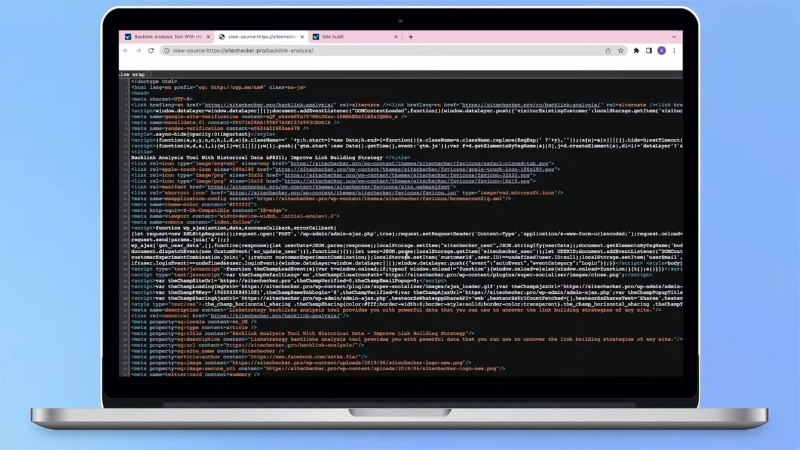
Modern templates often prioritize visual aesthetics over semantic structure. This leads to common mistakes such as multiple H1 tags per page, missing H2 sections, or headings replaced with styled <div> elements.
Google has repeatedly stated that heading structure helps systems understand content organization. While headings alone do not guarantee rankings, breaking a previously consistent hierarchy can remove clarity signals that were already working.
Blogs are especially vulnerable because article templates apply across hundreds or thousands of URLs. A single heading mistake becomes a sitewide problem instantly.
Common Heading Mistakes Introduced by Templates
Issue
Why It Matters
Multiple H1s
Dilutes the primary topic signal
No visible H1
Weakens page relevance
Skipping H2 to H4
Breaks content hierarchy
Headings hidden behind JS
Crawling and rendering delays
Before rollout, templates should be validated against existing high-performing articles to ensure their semantic structure remains intact or improves.
Page Speed and Core Web Vitals Regressions
View this post on Instagram
Template changes frequently add sliders, animation libraries, icon fonts, and tracking scripts. Each addition may seem small, but combined, they can push pages over performance thresholds that affect rankings.
Since the Page Experience update, Google uses Core Web Vitals as a ranking signal, especially for competitive queries.
According to Chrome UX Report data from 2023, only about 41 percent of mobile pages globally meet all Core Web Vitals thresholds. A template change that worsens performance can move your site from “good” to “needs improvement” overnight.
Largest Contentful Paint is the most common casualty. Hero images, web fonts, and delayed CSS loading introduced by new templates often increase LCP by one to two seconds.
Typical Performance Shifts After Template Changes
Metric
Safe Range
Common Regression Cause
LCP
under 2.5 s
Large hero images, font loading
INP
under 200 ms
Heavy JS menus, sliders
CLS
under 0.1
Late-loading ads or images
Performance should be measured on staging and compared page-by-page with production, not just averaged across the site.
Indexing and Crawlability Issues
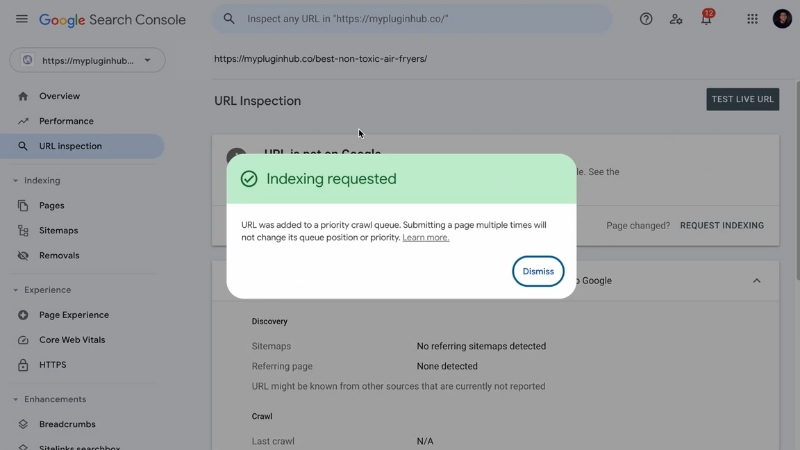
Templates increasingly rely on JavaScript-driven navigation, infinite scroll, and dynamic content loading. While Google can render JavaScript, it does so in a second wave, and not always reliably for internal linking.
Blogs with archives, pagination, or category structures are especially at risk. If pagination links are removed or replaced with infinite scroll without proper crawlable URLs, search engines may stop discovering older posts.
Google’s own documentation still recommends traditional pagination with static links for crawl efficiency. Sites that replaced pagination entirely with JS-based infinite scroll have repeatedly reported partial deindexing of archives.
Crawlability Risks Introduced by Templates
Change
Risk
JS-only menus
Links are not always crawled
Infinite scroll without URLs
Archive pages disappear
Hidden content tabs
Delayed indexing
Removed breadcrumb markup
Weaker hierarchy signals
Maintaining crawlable HTML links remains essential, regardless of how modern the design looks.
User Behavior Signals Often Shift After Redesigns
Template changes also affect how users interact with content. Layout shifts, font changes, ad placement, and navigation clarity influence engagement metrics that search engines monitor indirectly.
While Google denies using raw bounce rate from Analytics, multiple patents and studies suggest systems evaluate satisfaction signals such as pogo-sticking and long clicks.
A redesign that pushes content lower or adds intrusive elements can reduce perceived content quality even if the text remains unchanged.
In large content sites analyzed by SEMrush Sensor after redesigns, the average time on page dropped by 10 to 25 percent when content visibility decreased above the fold. Those drops often correlated with ranking declines for informational queries.
How to Safely Change a Blog Template Without Losing Traffic

The safest approach is to treat a template change like a site migration, even if URLs remain the same. That mindset forces documentation, benchmarking, and rollback planning.
Pre-Change Baseline Checklist
Area
What to Record
Top 100 pages
Traffic, rankings, URLs
Internal links
Link counts per page
Core Web Vitals
Page-level metrics
Index coverage
Indexed URLs by type
HTML structure
Headings, content order
During rollout, templates should be tested on a subset of URLs if possible. Many large publishers deploy new templates only on recent posts first to measure impact before full adoption.
After launch, logs, crawl stats, and Search Console reports should be monitored daily for at least four weeks. Most template-related traffic drops appear within 7 to 21 days, not immediately.
When Traffic Drops Anyway: How to Diagnose the Cause
If traffic declines after a template change, guessing is the worst response. The cause is usually visible in data if you know where to look.
Search Console is the first stop. Coverage changes point to crawl issues, while Performance reports segmented by page type often reveal whether losses are structural or content-specific.
Comparing HTML snapshots of affected pages before and after the change often exposes the issue quickly. In many cases I have seen, the problem was not content quality but simple things like category links removed from headers or article text loaded after multiple JS calls.
Long-Term Benefits of Getting Template Changes Right
@bloomingdesign.co A website template can help you launch that blog you’ve been dreaming about! #squarespacedesigner #websitetemplate #blogging101 ♬ super freaky girl x luxurious – xxtristanxo
While risky, template changes done correctly can strengthen a blog long-term. Cleaner HTML, improved internal linking logic, better mobile performance, and clearer content hierarchy often result in traffic gains after the reassessment period.
Data from multiple large publishers shows that sites that preserved internal links and improved Core Web Vitals often saw traffic increases of 5 to 20 percent within two to three months after a redesign, once systems stabilized.
The difference between loss and growth is rarely design quality. It is tea technical discipline, measurement, and respect for how search engines interpret structure.
Final Perspective
Template changes are not cosmetic updates. They rewrite how your entire blog communicates with search engines. Traffic drops happen when that communication is disrupted without safeguards.
When structure, links, performance, and crawl paths are preserved or improved intentionally, redesigns stop being a risk and become an opportunity to strengthen visibility across the entire archive.